
Game Integration API
Game account linking
The Game Account Linking APIs revolves around the concept of game accounts, which represents a player's identity in your game.Through the Game Account Linking process, you'll provide a GameAccount object toChallengermode which will be used to reference the player in your game, as well as optional additional game account data. Integrating the game account linking APIs is an essential step to integrating any game to Challengermode. Linking game accounts serves two main purposes:There are multiple methods to link game accounts for you to choose from depending on your game and backend capabilities. Each method is configurable in the account linking section of your Application Dashboard.
•
Verify the user's identity
The account linking process ensures that the user can verify their identity inside your game which confirms account ownership and increases trust when playing competitively.
•
Determining game account ID
The game account ID Challengermode obtains during the account linking process is the game account ID it will use in all subsequent communication with the game's backend, e.g. to create game sessions.
Note thath this step is a prerequisite for Game Handling as it providesChallengermode the necessary information to reference users that will be participating in competitions.
Concepts
Game Accounts
Game Account References
Game Account Login
Components
OAuth account linking
OTT
post
generate_verification_token using User authentication, and then posting the linking token to the post
verify-game-account endpoint.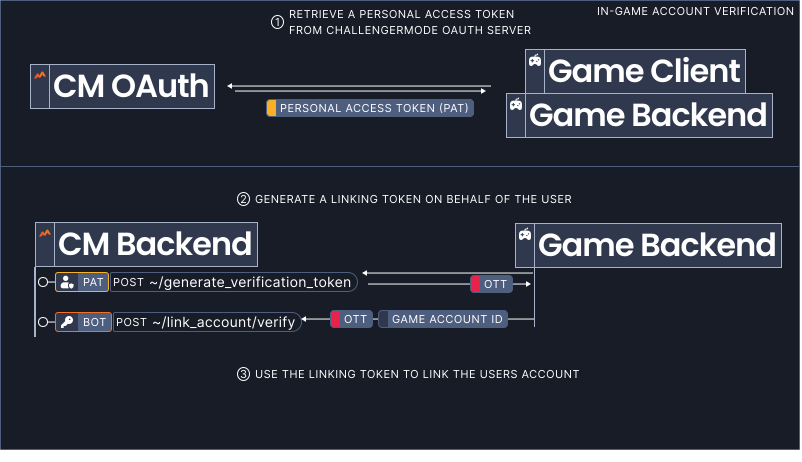
1
Retrieve a personal access token
Retrieve a throughChallengermode OAuth using a flow suitable for your game.
PAT
2
Generate an account linking token
Using the personal access token , generate an account linking token by calling the
PAT
OTT
post
generate-verification-token endpoint.curl --location --request POST
'undefined/mk1/v1/game_integrations/<game-integration-id>/link_account/generate_verification_token'
--header 'Authorization: Bearer <personal-access-token>'3
Use the linking token to link the game account
Send the linking token together with the user's game account ID toChallengermode's
post
verify-game-account endpoint.curl --location --request POST
'https://publicapi.challangermode.com/mk1/v1/game_integrations/<game-integration-id>/link_account/verify'
--header 'Authorization: Bearer <bot-access-key>'
--header 'Content-Type: application/json'
--data-raw '{
"accountLinkingToken": <account-linking-token>,
"gameAccountReference": {
"accountId": <internal-account-id>
}
}'SSO game account linking
The SSO account linking method verifies the player using the identifier from a configured third-party SSO provider (e.g. Steam) via the 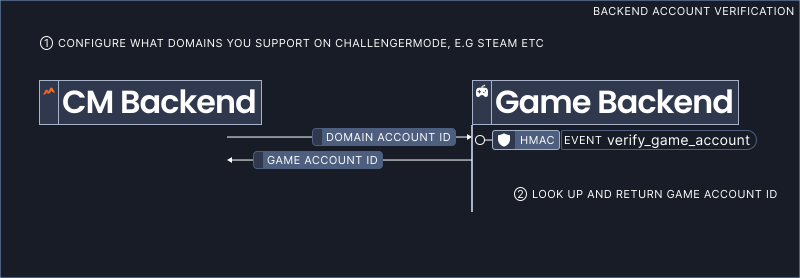 You'll find the configuration to support this account linking method in your Application Dashboard → account linking → SSO account linking.
event
verify-game-account event.1
Configure webhook
The first step is to configure the webhook that will be used to handle the
event
verify-game-account event. This webhook will be called when the user wants to link their account.2
Configure supported identity providers
Next, configure the third-party identity providers your game supports.Challengermodecurrently supports the following identity providers:'%20d='M4.891%20150.01C19.284%20198.02%2063.807%20233%20116.501%20233c64.34%200%20116.5-52.16%20116.5-116.5%200-64.341-52.16-116.5-116.5-116.5C54.761%200%204.241%2048.029.251%20108.76c7.54%2012.66%2010.481%2020.49%204.641%2041.25z'/%3e%3cpath%20fill='%23fff'%20d='M110.5%2087.322c0%20.196%200%20.392.01.576L82.002%20129.31c-4.618-.21-9.252.6-13.646%202.41a31.698%2031.698%200%200%200-5.455%202.88L.302%20108.83s-1.448%2023.83%204.588%2041.59l44.254%2018.26c2.222%209.93%209.034%2018.64%2019.084%2022.83%2016.443%206.87%2035.402-.96%2042.242-17.41%201.78-4.3%202.61-8.81%202.49-13.31l40.79-29.15c.33.01.67.02%201%20.02%2024.41%200%2044.25-19.9%2044.25-44.338C199%2062.882%20179.16%2043%20154.75%2043c-24.4%200-44.25%2019.882-44.25%2044.322zm-6.84%2083.918c-5.294%2012.71-19.9%2018.74-32.596%2013.45-5.857-2.44-10.279-6.91-12.83-12.24l14.405%205.97c9.363%203.9%2020.105-.54%2023.997-9.9%203.904-9.37-.525-20.13-9.883-24.03l-14.891-6.17c5.746-2.18%2012.278-2.26%2018.381.28%206.153%202.56%2010.927%207.38%2013.457%2013.54s2.52%2012.96-.04%2019.1m51.09-54.38c-16.25%200-29.48-13.25-29.48-29.538%200-16.275%2013.23-29.529%2029.48-29.529%2016.26%200%2029.49%2013.254%2029.49%2029.529%200%2016.288-13.23%2029.538-29.49%2029.538m-22.09-29.583c0-12.253%209.92-22.191%2022.14-22.191%2012.23%200%2022.15%209.938%2022.15%2022.191%200%2012.254-9.92%2022.183-22.15%2022.183-12.22%200-22.14-9.929-22.14-22.183z'/%3e%3c/svg%3e)


Steam
EA
Battle.net
Ubisoft
Apple
Microsoft Live
3
Handle the event
event
verify-game-account will be called when a user wants to link a game account. The payload will specify the identity provider (e.g. Steam) and contain the domain-specific account ID (e.g a Steam ID).To handle the event, the game backend should:•
Look up the user
Look up the user corresponding to the external provider ID.
•
Return the game account ID
If the user exists, return their game account ID.
Intent game account linking
device
verify-game-account intent, passing an account linking token OTT
post
verify-game-account endpoint.The round trip through the game client, game backend, and Challengermode ensures that the user rightfully owns the game account being linked.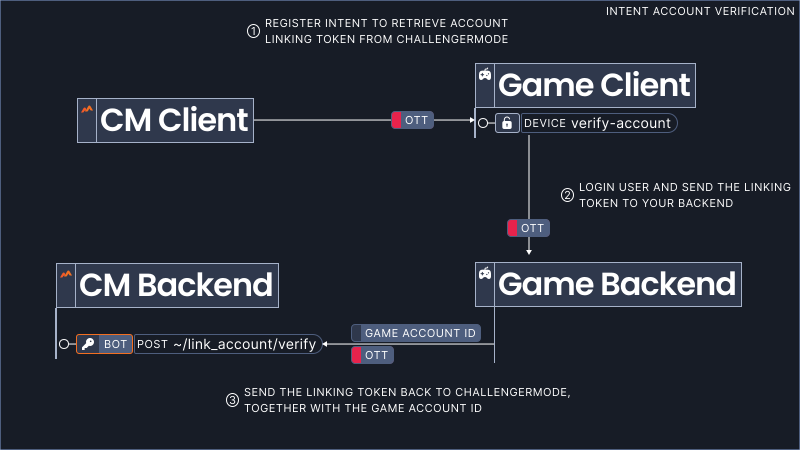
1
Configure supported platforms
The first step is to configure the platforms that should support this account linking method. You can read more about platform configuration here.
2
Parse the intent on the device
When the intent is invoked on the device, parse the linking token contained in the intent payload.
OTT
ott = ParseIntent(intent)3
Inform the player (optional)
We encourage you to render an dialog to confirm the user's intent to link their game account toChallengermode before proceeding.
4
Pass the linking token to your backend
Pass the account linking token to your backend server over an authenticated channel.
OTT
LoginToBackend()
    SendOttToBackend(ott) // send ott to backend over authenticated channel
5
Verify the game account
The server should now authenticate the user to then submit the linking token together with the user's game account ID toChallengermode's
OTT
post
verify-game-account endpoint.accountId = authorizedUser.Id
ChallengermodeClient.VerifyAccount(gameAccountReference:{accountId: accountId}, accountLinkingToken: ott)Game account details
•
Implement the get-game-account webhook
Listen to the
event
get-game-account webhook and returning a GameAccount.•
Post the game account
Upload a GameAccount directly through the
post
game-accounts endpoint.Implement the get-game-account webhook
event
get-game-account webhook event will be called directly after a user links their game account and wheneverChallengermode needs to retrieve or update the information about a game account.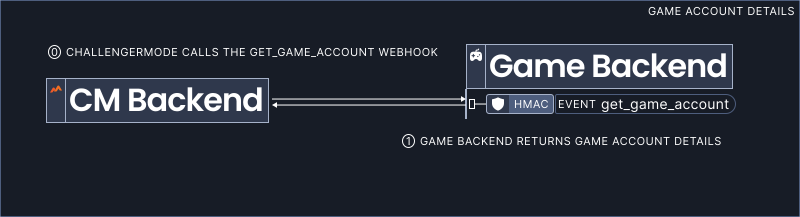
1
Configure webhook
You'll find the configuration for the game account details webhook in your Application Dashboard → account linking → game account details.
2
Handle the event
Your webhook should handle the
event
get-game-account event by parsing the game account ID provided in the payload and returning a GameAccount.{
"gameAccountReference": { "accountId": "<game-account-id>" },
"displayName": "SpinToWin",
"profileImageUrl": "https://gamecdn/path-to-profile-img",
}Most properties of the game account model are optional but improve the overall user experience.
Post game accounts
post
game-accounts endpoint.curl --location --request POST
'https://publicapi.challangermode.com/mk1/v1/game_integrations/<game-integration-id>/game_accounts/{gameAccountId}'
--header 'Authorization: Bearer <bot-access-key>'
--header 'Content-Type: application/json'
--data-raw '{
"gameAccountReference": { "accountId": <game-account-id> },
"displayName": "SpinToWin",
"profileImageUrl": "https://gamecdn/path-to-profile-img",
}'